
.png)
QuickBooks got you here.
It tracked your invoices. It handled your books. It did exactly what it was supposed to do when your business was smaller and simpler.
But something's changed.
Maybe you're running reports that take three tools and half a Friday to produce. Maybe your operations team is making decisions based on numbers that are always a little bit behind. Maybe you've got multiple locations, multiple entities, or a supply chain that QuickBooks was never designed to manage.
And somewhere in the middle of all of that, you've started asking a question you weren't asking two years ago:
"Is QuickBooks still the right tool for where we're going?"
This article helps you answer that honestly, without the vendor hype.
QuickBooks Is Not the Problem. Outgrowing It Is.
Let's be clear about something first: there's nothing wrong with QuickBooks.
It's genuinely excellent software for what it was built to do, which is manage accounting for small businesses with straightforward operations. Millions of businesses run on it successfully, and they should.
The issue isn't the software. It's the fit.
When a business grows past a certain point in revenue, in complexity, in operational depth, QuickBooks starts showing its edges. Not because it broke. Because you built something bigger than it was designed to hold.
Here's what that typically looks like.
Your accounting team is spending significant time every week manually moving data between QuickBooks and spreadsheets, your project management tool, your inventory system, and whatever else you're using to run the business. Each of those manual transfers is a place where errors happen and time disappears.
Your job costs are always a little bit off because labor data comes from one place, material costs from another, and someone has to reconcile them manually after the fact. By the time the numbers are clean, the job is already done.
Your financial close takes longer than it should because pulling a complete picture of the business requires data from multiple disconnected systems that don't talk to each other automatically.
Your leadership team is making decisions based on last week's numbers, not today's.
None of these are QuickBooks problems. They're scale problems. And scale problems require a different category of solution.
Real Example: CoachComm, a PTP client in manufacturing, had a full-time employee dedicated entirely to managing MRP through spreadsheets eight hours a day, every day. Their inventory had ballooned because without reliable planning data, the team over-ordered out of fear of stockouts, tying up cash and warehouse space. With assemblies running up to 25 component levels deep, the manual process wasn't just slow it was unsustainable. They didn't fully see the cost of those workarounds until the discovery phase mapped out how much time and money was disappearing into the gaps between their four disconnected legacy systems. Read the Full CoachComm story
The Real Difference Between Accounting Software and ERP
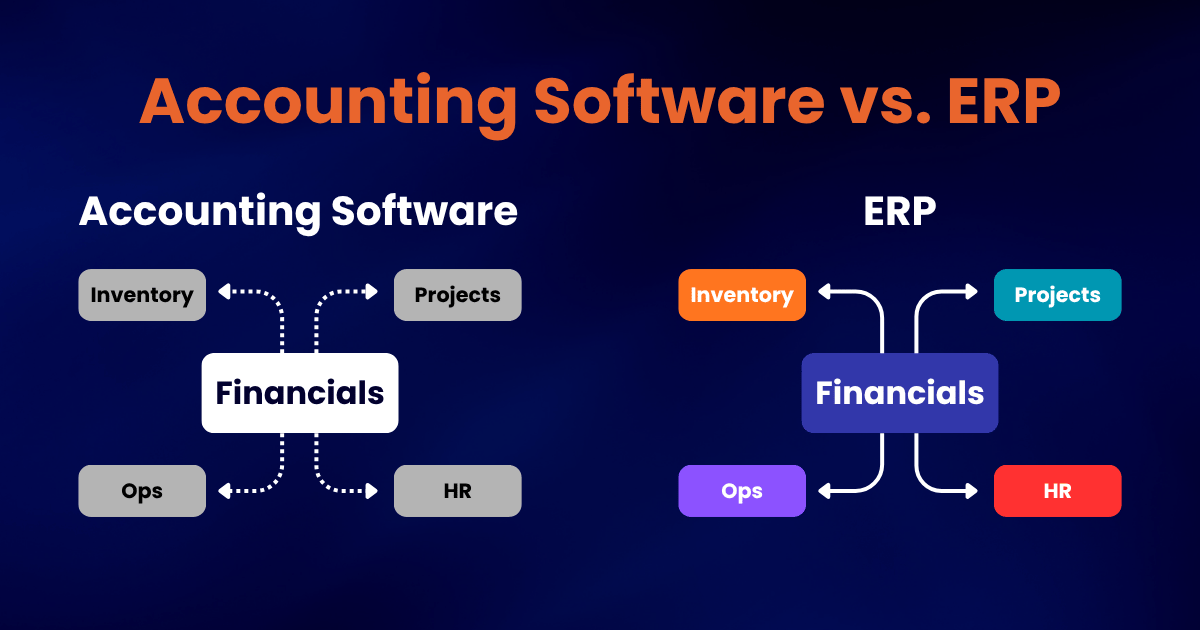
Most people think of QuickBooks alternatives as "better accounting software." That's not quite the right frame.
The real difference isn't accounting features. It's how the system handles your entire business, not just your books.
QuickBooks is accounting software. It manages your financial transactions and produces financial reports. It does this well.
An ERP connects your accounting to everything else. Operations. Inventory. Manufacturing. Project management. Sales. Field teams. All in one system, updating each other in real time.
When your CFO pulls a report in an ERP, it reflects what happened in operations this morning, not what someone entered last Thursday.
When a job goes over budget, the system knows before the invoice does.
When you add a new entity or location, it fits into the same platform instead of requiring a new set of spreadsheets to reconcile with everything else.
That's not a better accounting tool. That's a different category of business infrastructure.
5 Signs You've Actually Outgrown QuickBooks
These aren't vague warnings. These are specific, operational signals that the fit has changed.
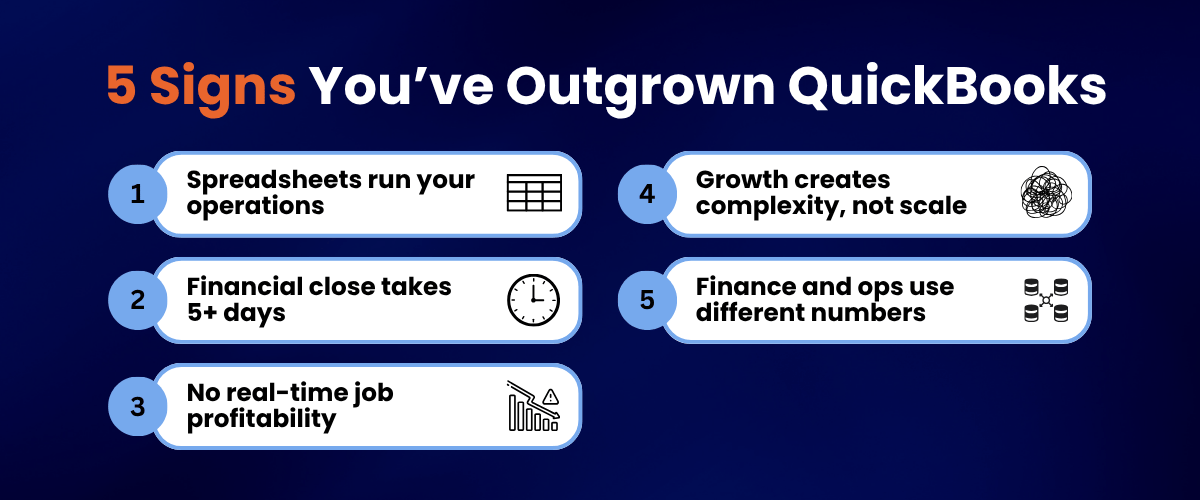
1. You're managing operations in spreadsheets that feed into QuickBooks. If your real source of truth for inventory, job costs, project status, or scheduling lives in a spreadsheet and someone manually moves that data into QuickBooks, you have a system problem. Not a process problem. The system is making you create workarounds it should be handling automatically.
2. Your financial close takes more than five days. For most businesses at this stage, a close that drags past five days is a sign that pulling a complete financial picture requires too many manual steps across too many disconnected systems. An ERP built for your business size should get you to a 3 to 5 day close consistently.
3. You can't see job or project profitability in real time. If you find out a job went over budget after it's done, not during, your cost visibility is running too far behind your operations. Decisions are being made without current data. That gap gets more expensive as revenue grows.
4. Adding people, locations, or entities creates new complexity instead of just more of the same. Growth should be additive. If every new hire, new location, or new business unit requires a new workaround in your current setup, the system isn't scaling with you. It's holding you back from scaling cleanly.
5. Your operations team and your finance team are always working from different numbers. When operations tracks things one way and finance tracks things another, reconciliation becomes a weekly tax on everyone's time. In an ERP, both teams work from the same data in real time. The reconciliation conversation disappears.
What to Actually Look For in a QuickBooks Alternative
Not every ERP is built for the same business. Before you commit to anything, here's what matters most.
Industry fit comes first. If you're in construction, manufacturing, distribution, or professional services, the operational complexity of your business requires a platform with depth built for your industry, not just a general ledger with more features. A construction company needs project accounting, subcontractor management, and field visibility. A manufacturer needs bills of materials, production scheduling, and quality control. These aren't nice-to-have add-ons. They're core requirements. Make sure the platform you're evaluating has them built in natively, not through a patchwork of third-party tools bolted on after the fact.
Real-time visibility is non-negotiable. This is the question to ask in every demo: "Show me what the data looks like right now." Not a report that ran last night. Not a dashboard that refreshes every four hours. What does the system know about this morning's activity right now? If the answer involves any kind of manual trigger, batch process, or delay, that's not real time. Keep looking.
Licensing should grow with you, not against you. Some platforms charge per user. At 20 employees that's manageable. At 100, it's a serious cost problem that gets worse every time you hire. Acumatica, for example, charges based on what you use rather than how many people are logged in, which means your software costs don't jump every time you bring someone on. For growing businesses, how the pricing scales matters just as much as the features.
Integration with your existing tools matters more than you think. Your new platform needs to connect with the tools you're not replacing, like your payroll provider, your CRM, your industry-specific software, and your bank. Every integration that has to be stitched together manually is a future maintenance problem. Ask which connections are built in, which are handled through open interfaces, and which require a third party to maintain.
And the implementation partner matters as much as the platform. This is the one that gets overlooked most often. An ERP configured by someone who has never worked with a business like yours will be configured around assumptions that don't match how you actually operate. Make sure your implementation partner has specific experience in your industry and can point to results, not just references.
Real Example: Carma Group, a Las Vegas general contractor with over $100M in revenue, had outgrown QuickBooks Online and knew they needed an ERP with real construction depth. QuickBooks lacked job costing, retainage tracking, and commitment management, the basics for a company running high-profile projects like the Bellagio grandstand for Formula One. During evaluation, the deciding factor was that Acumatica's Construction Edition had project accounting, subcontractor management, and field-level visibility built in natively plus seamless integration with Procore, which Carma already relied on. That single difference eliminated an entire layer of manual data transfers and gave project managers real-time margin visibility they'd never had before. Read the Full Carma Group story
What Growing Businesses Are Moving To
For mid-market businesses in manufacturing, distribution, construction, and professional services, the two most common QuickBooks alternatives that actually fit at this stage are Acumatica and Microsoft Dynamics 365 Business Central.
Acumatica is built for growth-stage businesses that need industry depth, flexible pricing, and a system that adapts to how they work instead of requiring them to adapt to it. Its construction, manufacturing, and distribution tools are purpose-built, not retrofitted. And because it doesn't charge per user, the cost model actually makes sense as you scale from 50 employees to 200 and beyond. For businesses where growth is the plan, not just the hope, that pricing structure changes the math on ERP entirely.
Dynamics 365 Business Central is the natural fit for businesses already deeply embedded in the Microsoft ecosystem, meaning Teams, Office 365, and Azure. If staying in Microsoft's world matters strategically and your operational complexity is moderate, Business Central brings ERP-level capability into an environment your team already knows. It's also worth noting that Microsoft offers a Bridge to Cloud promotion through 2027 with meaningful discounts for businesses moving from legacy Microsoft products.
Both are significant steps up from QuickBooks in terms of what they can handle operationally. The right choice depends on your industry, your growth trajectory, and how your business actually runs day to day.
Real Example: Two PTP clients at similar growth stages chose different paths. CoachComm, a manufacturer with complex make-to-order operations and 25-level assemblies, went with Acumatica because of its production scheduling depth, built-in MRP, and consumption-based pricing that wouldn't penalize them for giving every department access. Key Code Mediam that lived in spreadsheets and Sage 100, also chose Acumatica but for differ, a professional services and distribution firm with nine offices and a teaent reasons: unified project accounting, CRM in one platform, and a cloud-native setup that eliminated $30K+ in annual server costs while supporting a 70% growth surge. In both cases, the decision came down to operational fit, not a features checklist. Read the Full Key Code Media story
What This Looks Like in Practice
LVT (LiveView Technologies) is a good example of what happens when a growing business hits the ceiling of its financial software and makes the move at the right time.
LVT was growing fast. Too fast for disconnected financial and manufacturing systems to keep up. Their financial close was taking 15 days every month. They scaled from 75 to over 230 employees during their growth period and couldn't afford to add accounting headcount just to keep pace with the volume.
They were in exactly the position this article describes: the software wasn't broken, but the business had outgrown what it could do.
After implementing Acumatica with PTP, their financial close dropped from 15 days to 5. They scaled through the entire growth period without adding accounting staff. And when the pandemic hit, cloud access meant their team kept running without interruption.
That's not a QuickBooks upgrade. That's a different category of business infrastructure, one that scaled with the business instead of creating friction as it grew.
The Question Worth Asking Right Now
Not "should we replace QuickBooks?" That's the wrong starting point.
The right question is: "Is our current system creating drag on the business, and what's that drag actually costing us?"
If the answer involves hours of manual reconciliation every week, financial closes that run too long, job costs that are always a little bit off, or leadership decisions made on data that's never quite current, the drag is real. And it compounds as the business grows.
The businesses that scale cleanly aren't the ones that found better accounting software. They're the ones that recognized when accounting software wasn't enough anymore, and built the right foundation before the friction got worse.
Ready to See What the Right System Looks Like?
If you've been wondering whether QuickBooks is still the right fit, the answer probably isn't a better version of QuickBooks. It's a clearer picture of what your business actually needs.
Here's what happens when you book a Catalyst360 Discovery Session with PTP. We learn how your business runs today, where your current tools are creating drag, and what the right technology foundation looks like for where you're headed. No pressure to pick a platform. No generic pitch. Just clarity.
Talk to PTP About What the Right System Looks Like →
See how Acumatica compares for growing businesses →
Already know you need ERP? See PTP's Implementation Services →
SUBMIT YOUR COMMENT