
Your current ERP system is holding you back.
Maybe Great Plains is hitting its limits. Maybe your on-premise system can't keep up with the reporting your leadership team needs. Maybe Microsoft's end-of-life announcement just made the decision for you.
Either way, you know a migration is coming. And somewhere in the back of your mind, a quiet voice is asking:
"How do we do this without breaking everything in the process?"
That's the right question. And most companies ask it too late, after they've already committed to a platform, signed a contract, and booked a go-live date that's six months away.
This article answers it at the right time. Before you start.
Why ERP Migrations Fail (And It's Never the Software)
Here's what nobody tells you when you're evaluating platforms:
The software almost never causes a migration to fail.
The planning does.
Companies watch demos. They compare feature lists. They pick a platform. And then three months into implementation, they discover that a workflow four departments depend on was never documented. A custom report someone built in GP eight years ago is now mission-critical. An integration with a third-party tool that nobody mentioned is now holding up go-live.
These aren't technical surprises. They're planning gaps.
And they're almost entirely preventable if migration planning starts in the right place.
Real Example: When IOC Construction came to PTP, they were managing over 300 projects annually across construction, painting, roofing, and maintenance divisions. Mid-migration, the team discovered that a custom AP approval workflow had been built separately inside each division none of which had been flagged during initial scoping conversations. That single gap added weeks to the timeline and required unplanned consulting hours to reconcile before go-live. It's one of the clearest examples we've seen of a planning miss that had nothing to do with the software. Read the full IOC Construction story
The Right Place to Start Isn't the New System. It's the Old One.
Before you plan where you're going, you need to understand exactly what you're leaving behind.
Not what your current system is supposed to do. What it actually does. Right now. In the real world.
That means finding every workflow that touches the system. Not just the official processes, but the real ones. The spreadsheet someone built five years ago that now feeds a weekly report. The manual export that happens every Monday. The workaround your accounting team uses because the system doesn't do something the right way. These things don't appear in your system documentation. They live in people's heads. And if you migrate without surfacing them, you'll find out they existed when the new system doesn't do what everyone assumed it would.
It also means mapping your data before you move it. How clean is it? Are there duplicate records? Incomplete fields? Legacy entries from a company you acquired that nobody's touched in three years? Data problems that are invisible inside your current system become very visible, and very painful, during migration.
And it means documenting every single integration. Payroll providers. CRM systems. Third-party reporting tools. Bank feeds. Industry-specific platforms. Every connection your current system has needs to be mapped before you move anything. Discovering an integration exists during go-live week is a crisis that could have been a footnote.
This is exactly what a proper ERP discovery phase does, and if you've already built your technology roadmap, most of this work is done. If you haven't, this is where ERP migration planning has to start. You cannot plan a migration from a system you don't fully understand.
Three Questions to Answer Before Any Migration Work Begins
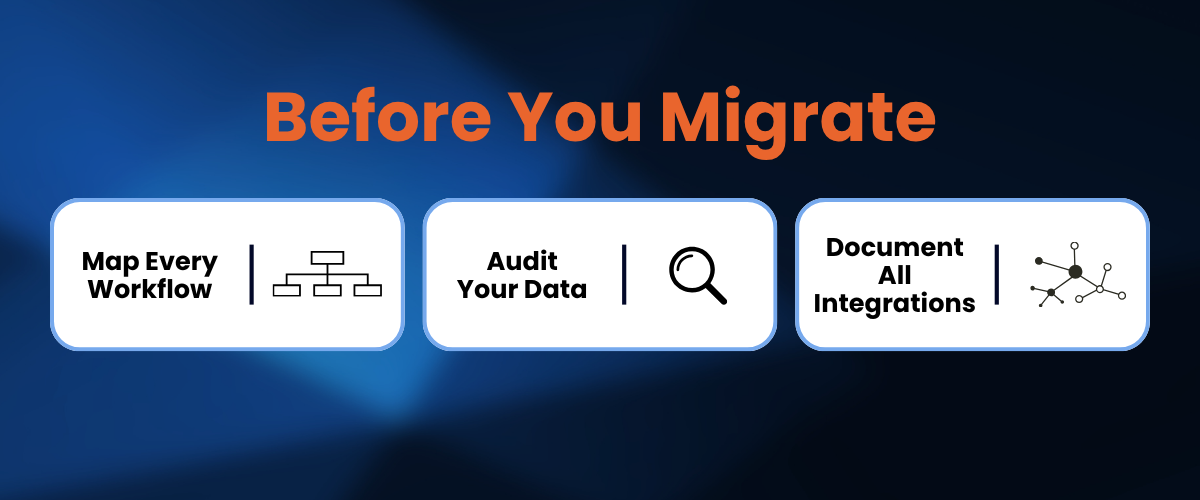
Before a single line of migration work starts, someone needs to answer three questions. Not informally. In writing. With the whole leadership team aligned.
1. What does success actually look like, and how will you measure it?
"Go live" is not a success metric. It's a date.
What does success actually look like? Faster financial close? Real-time job costing visibility? Multi-entity reporting in one place instead of four? Define it specifically. Make it measurable. You'll need this when someone asks six months after go-live whether the migration was worth it.
2. What absolutely cannot break during the transition?
Payroll. Invoicing. Customer-facing operations. Every business has processes that cannot go down, even for a day. Name them before the migration plan is built, not after. These need to be protected on purpose, not left to chance.
3. What does your team need to be ready for?
Your people built muscle memory around the current system. They know where everything is. They know the workarounds. They know which report to pull on the 15th of the month.
A migration that goes live and expects everyone to figure it out on their own creates a productivity crash that can take months to recover from. And the people who feel it hardest are your best employees, the ones who knew the old system inside and out.
Define success. Protect what matters. Prepare your people. Do these three things before anything else, and you've already outplanned most ERP migrations.
Real Example: Carma Group a fast-growing Las Vegas general contractor with over $100M in revenue defined same-day project cost visibility as non-negotiable before migration planning began. That single decision shaped how every phase was sequenced. Go-live dates were deliberately set outside their busiest project cycles, billing workflows were mapped and protected from day one, and the team never missed a beat on active jobs during the transition. When you name what can't break before the plan is built, the whole plan changes for the better. Read the full Carma Group story
The One Decision That Reduces More Risk Than Anything Else: Phase It
The single biggest risk in any ERP migration is trying to do everything at once.
A big-bang launch where every process, every entity, and every user goes live on the same day puts your entire business on the line at the same time. All workflows change at once. If something breaks, there's no fallback. And something always breaks.
A phased migration looks completely different.
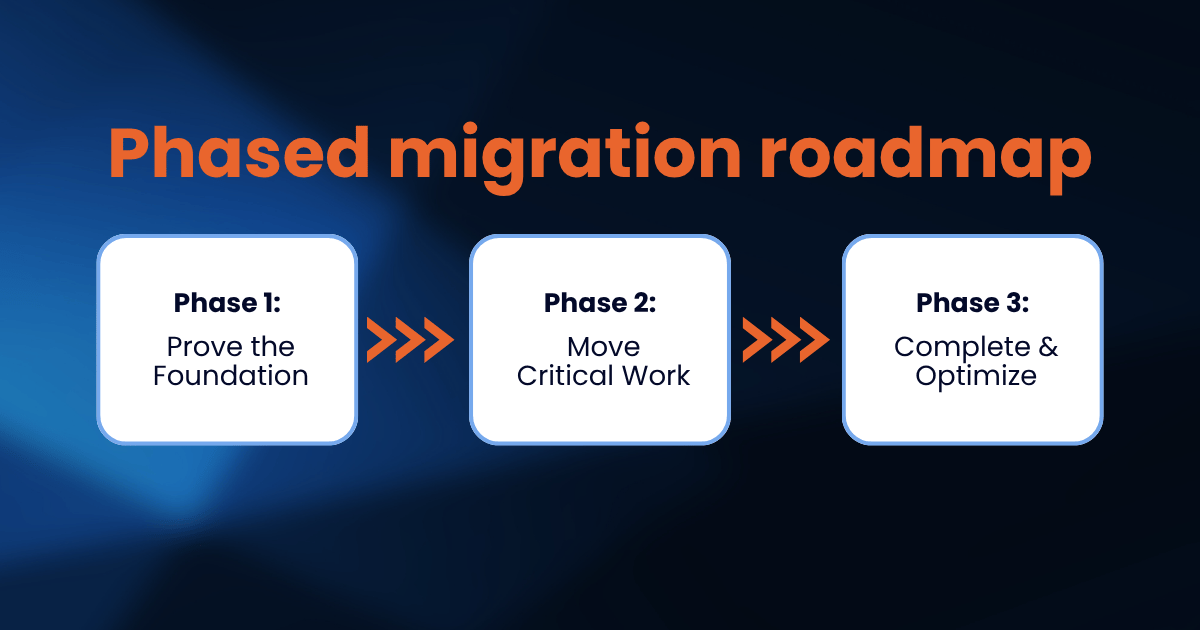
Phase 1: Prove the foundation first. Start with core financials in a lower-risk area of the business. One entity. One division. The goal isn't full deployment. It's learning how the new system behaves in your real environment before your most critical operations depend on it.
Phase 2: Move the critical work. Once Phase 1 runs clean, migrate your revenue-generating processes and full financial close. This is where you test that the system handles mission-critical functions the way you need it to, with real data, in real conditions.
Phase 3: Complete and optimize. Remaining entities, advanced features, deeper automation. By now your team knows the system. Picking up more complex tools is dramatically easier than it would have been on day one.
Every phase builds confidence. Every phase gives you a checkpoint to catch problems before they snowball. And every phase keeps your business running while the migration happens underneath it.
Real Example: Mid-States Companies a vertically integrated construction and manufacturing firm with 12 operational entities is exactly the kind of organization where a big-bang launch would have been catastrophic. PTP phased their migration across entities, starting with a single division. In Phase 1, the team caught a data mapping issue tied to their inter-entity transaction structure, the kind of problem that, discovered on a full 12-entity go-live day, would have taken weeks to unwind. Caught early with one division live, it took two days to fix and never touched the others. Read the full Mid-States Companies story
Data Migration Deserves Its Own Plan
Data migration shouldn't be a section inside your general migration document. It needs its own plan, and that plan needs to answer four things.
First, what moves and what doesn't? Not all historical data needs to live in the new system. Deciding what migrates, what gets archived, and what gets left behind is a business decision, not a technical one. Make it deliberately. The default "move everything" approach is almost always the wrong call.
Second, how clean is the data before it moves? Migrating dirty data doesn't clean it. It just moves the mess into a system where it now looks trustworthy but isn't. Deal with duplicates, incomplete fields, inconsistent formatting, and legacy entries before anything gets transferred.
Third, how will you verify it after migration? Financial records need to match. Historical transactions need to tie back. Build formal checkpoints into every phase, not just a quick spot-check at the end.
And finally, what's your rollback plan? Before you start any data migration, answer this: if something goes wrong, what do you do? Your current system should stay up and accessible until post-migration checks are fully complete. Never shut off the old system the day you turn on the new one.
Change Management Starts Now, Not the Week Before Go-Live
Here's what most migration plans get wrong about change management: they treat it as a go-live activity. A training session the week before launch. A user guide nobody reads.
It's not. It starts months before.
Bring your best people into the planning early. The employees who know your current system best need to be part of the migration process, not just the training session at the end. When people help build a plan, they own it. When a plan is handed to them, they tolerate it.
Tell them "why" before you tell them "what." Not just "we're upgrading the system." Why this system? Why now? What will actually get better for them, specifically, in their day-to-day work? The clearer that answer is, the less resistance you'll see.
Plan for the slow weeks. No matter how well you prepare, the first weeks after go-live will be slower than normal. Build breathing room around the launch window. Don't measure the new system's performance against what the old one could do on autopilot.
And put system champions in every department. People who go through deeper training and become the first person their teammates turn to with questions. Peer support drives adoption faster than any help desk ticket ever will.
Go-Live Is the Starting Line, Not the Finish Line
The 90 days after go-live determines whether your ERP migration delivers on its promise or becomes another system your team works around.
This is where most migrations quietly succeed or quietly fail.
Support needs to be higher, not lower, in the weeks after launch. Quick wins need to be found and celebrated. Two or three things the new system does visibly and immediately better than the old one. The success metrics you defined at the start need to be tracked now, not forgotten.
And a roadmap for what comes next needs to already exist. An ERP migration is the beginning of a technology shift, not the end of one. Once your system is stable and your team is comfortable, an entire layer of optimization, automation, and integration becomes possible.
That's where the real return on investment lives. Not in go-live, but in what the system makes possible once your team is actually using it.
What Raubex Construction Learned About Migration Planning
Raubex Construction came to PTP after three years of struggling with a legacy ERP system. Three years of working around it. Three years of inventory control, data visibility, and reporting that were all disconnected.
When they finally decided to migrate, they didn't jump to a new platform. They started with discovery, mapping exactly where the current system was breaking down, what data needed to move, and what workflows needed to be rebuilt rather than copied.
With that clarity in hand, PTP implemented Acumatica Advanced Construction in five months.
What took three years to get wrong took five months to get right because the migration started with a clear picture of reality, not a sales demo.
Migrating from Great Plains? Here's What Makes GP Moves Different
If your migration is specifically from Great Plains to a modern cloud ERP, there are challenges a generic migration approach won't cover, and they're worth calling out.
The data structures in GP are unique. The custom reports your team built over the years don't have direct equivalents in modern platforms. Historical records need to stay accessible even after the move. And integrations that were built for an on-premise world need to be rethought for the cloud.
None of these are surprises if you plan for them. All of them are surprises if you don't.
PTP's GP Migration Assessment is built to surface these issues before they become go-live problems. And our GP Migration Services handle the full transition with the detail and sequencing that GP moves actually require.
Frequently Asked Questions
How long does an ERP migration actually take? It depends on complexity, but most mid-market migrations run 4 to 9 months from kickoff to go-live. Companies that try to squeeze that timeline are usually the ones that end up extending it. A phased approach helps manage both timeline and risk at the same time.
What happens to our historical data? It depends on what you decide to migrate. Not all historical data needs to move, and migrating everything by default often creates more problems than it solves. A strong data plan defines what moves, what gets archived, and what stays in the old system for reference. Your current system should stay accessible until post-migration checks are fully complete.
Can we stay on Great Plains a little longer while we plan? Yes, but the planning needs to start now, not when you're ready to move. The companies that start GP migration planning early get better results because they're planning from a position of choice, not panic. Microsoft's end-of-support timeline is real, and migrations planned under pressure are migrations planned poorly.
Ready to Plan Your ERP Migration the Right Way?
If a migration is on your horizon, whether from Great Plains, an aging on-premise system, or a platform your business has simply outgrown, the time to plan is before urgency forces your hand.
Here's what happens when you book a Catalyst360 Discovery Session. We sit down and learn how your business actually runs, your systems, your workflows, your data, your people. Then we map the migration risks specific to your environment, not a generic checklist. And you walk away with a clear, phased roadmap that protects your operations throughout the transition.
No pressure. No generic pitch. Just clarity on what your migration actually needs to look like.
Start Your ERP Migration Planning → Schedule a Discovery Session
Migrating from Great Plains? → See PTP's GP Migration Services
Not sure where you stand? → Start with a GP Migration Assessment
Because the best migrations don't feel like migrations. They feel like your business finally running the way it was always supposed to.
SUBMIT YOUR COMMENT