
If you have recently seen an error message reading "XSLTProcessor is not defined" while working in Acumatica, you are not alone. This is not a problem with your Acumatica instance. It is a browser change, and there is a clear path to resolving it.
Here is what is happening, why it is happening, and what you can do about it.
What Changed
Starting November 17, 2026, Google removed support for XSLT processing in all Chromium-based browsers: Google Chrome, Microsoft Edge, Brave, Opera, Vivaldi, Arc, and Samsung Internet all build on Chromium. Google Chrome and Microsoft Edge are the two browsers most Acumatica users rely on daily.
XSLT is a background technology that some Acumatica screens, particularly those still running on the Classic UI, depend on to load and render properly. With that support removed at the browser level, those screens can no longer function in Chrome or Edge the way they did before.
This change is rolling out to users at different times depending on browser version and update schedule, so some users may have already encountered the error while others have not seen it yet. If you have not experienced it, you likely will as your browser updates.
What You Will See
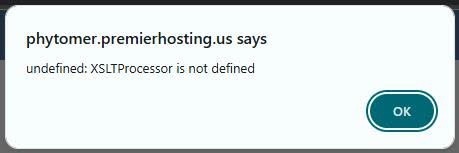
The most common symptom is an error dialog that reads "undefined: XSLTProcessor is not defined" when trying to open certain Acumatica screens. The affected screens are ones that still use the Classic UI. If your team has already fully transitioned to the Modern UI, this change should not affect your day-to-day work.
For teams using a mix of Classic and Modern UI screens, some workflows will continue to work normally while others will be interrupted. The impact depends entirely on how much of your Acumatica environment still relies on Classic UI.
How to Resolve It
There are several options depending on your Acumatica version and hosting setup.
If you are on Acumatica 2025 R1 or later (SaaS): Acumatica has already delivered a patch that allows Classic UI screens to continue loading in Chromium browsers. SaaS customers on 2025 R1 or later should receive this patch automatically. No action is required on your end.
If you are on Acumatica 2025 R1 or later (PCS / self-hosted): You will need to apply the patch manually. The patch and instructions are available on the Acumatica Community patches page. If you need assistance applying it, reach out to our support team.
If you are on Acumatica 2024 R2 or earlier: The patch is not available for older versions. Your best options are to upgrade to 2025 R1 or later to receive the fix, or to use Mozilla Firefox as your browser in the meantime. Firefox is not affected by this change and will continue to support Classic UI screens.
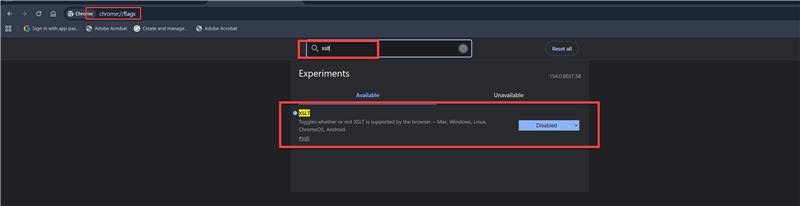
As a temporary browser-level workaround: You can re-enable XSLT support in Chrome or Edge by navigating to chrome://flags, searching for "XSLT," and setting the flag back to "Enabled." This is a short-term fix, as Google may remove this flag entirely in a future browser update.
The Bigger Picture: Classic UI Is Being Retired
This browser change is worth understanding in context. Acumatica has been moving toward its Modern UI for some time, and Classic UI is scheduled for deprecation in Acumatica 2026 R2. That means even with the current patch, Classic UI screens are on a limited runway.
If your team is still relying on Classic UI for certain screens or workflows, now is a good time to begin planning the transition to Modern UI. The browser change makes that transition more urgent, but it was already on the horizon.
What Premier Recommends
For most clients, the immediate step is straightforward. If you are on 2025 R1 or later and hosted by Acumatica (SaaS), the fix should arrive automatically. If you are self-hosted, apply the patch. If you are on an older version, use Firefox as a bridge while planning your upgrade path.
Beyond the immediate fix, we recommend using this as an opportunity to evaluate where your environment stands on the Classic-to-Modern UI transition. The sooner that transition is complete, the less exposure you will have to browser-level changes like this one going forward.
If you are unsure which screens in your environment are still running on Classic UI, or if you need help applying the patch or planning your upgrade path, our support team is here to help.
This advisory applies to all Acumatica users accessing the system through Google Chrome or Microsoft Edge. If you have questions specific to your environment, please contact our support team at info@premiertechpartner.com .
SUBMIT YOUR COMMENT